Vermont State Colleges System

Vermont's Higher Education

  • I Am A…
    • Student
    • Working Adult
    • Parent
    • Veteran
    • Employer
    • School Counselor
    • Senior Citizen
    • Faculty/Staff
    • State Employee
  • Apply
  • Employee Resources
    • Portal
    • Email
    • Whistleblower Hotline
    • Campus Administrators
    • Agreements & Handbook
    • Benefits
    • Retirement Services
    • VSCS Foundation
    • Office of Sponsored Proj.
  • Academic Programs & Initiatives
    • College Entry Opportunities
    • Advance Vermont Partnership
    • Community College of Vermont
    • Vermont State University
  • Workforce Development
    • Certificates & Training
  • About the VSCS
    • About Vermont State Colleges
    • Mission & Vision
    • Transformation
    • Our History in Vermont
    • Learning Locations
    • Diversity, Equity, Inclusion, and Social Justice
    • System Data
  • Board of Trustees
    • Committee Liaisons
    • Meeting Schedule
    • Agendas & Materials
    • Policies & Procedures
    • Trustee Handbook & Bylaws
    • Contact the Board
  • Chancellor’s Office
    • Contact the Chancellor’s Office
    • Chancellor Elizabeth Mauch
    • VSCS Office of Sponsored Projects
  • Shared Services
    • VSCS Shared Services
    • Shared Services Directory

Video Conferencing

In preparation for the switch to Zoom, you will have until July 31, 2018 to download any saved recordings from Adobe Connect. Please follow the instructions below for exporting recordings.

Exporting a Video from Adobe Connect:

1. Login to Adobe Connect at https://vscmymeeting.adobeconnect.com

2. Select on the ‘Meetings’ tab at the top, just below the VSC logo.

3. Click on the name of the meeting that has the recording you are trying to export.

4. Select on ‘Recordings’ in the list of links above the bar that says ‘Meeting Information’.

5. Find the meeting instance you want to export and select the Actions to the right of the title. Then select ‘Make Offline’.

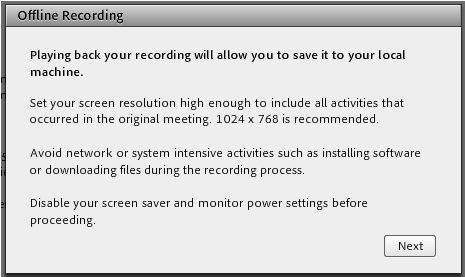
6. A recording of your meeting will open with some helpful hints for how to make it come out well. Make sure you read those as whatever else you’re doing on your computer at the time can impact the quality of your video. Once you’re ready, select ‘Next’.
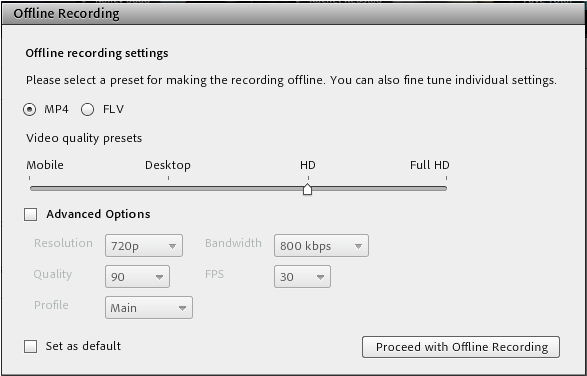
7. A screen will appear with some options. The defaults, ‘MP4’ and ‘HD’ will be fine for most people. Once you have this set the way you want, select on ‘Proceed with Offline Recording’.
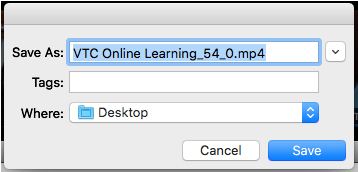
8. Another popup will ask you where you want to save your file to. Choose your location and select ‘Save’.
9. Let your video play. It will export as it goes and you can watch the progress bar at the bottom to see how much is done and how long is left.

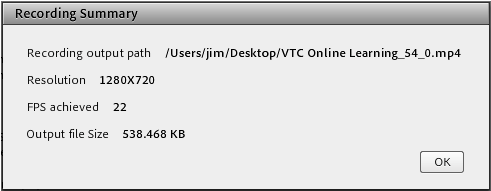
10. When you’re done you’ll get a summary screen. Select ‘Ok’, find and open your exported video file and spot check it to make sure everything is as expected.


Learn More

  • Home
  • Academic Programs & Initiatives
  • Workforce Development
  • Board of Trustees
  • Student Finance FAQ
  • 1098T Information
  • Apply
  • Burlington College Records
  • Public Records Requests

Work With The VSCS

  • Requests for Proposals
  • Employment

Employee Resources

  • Portal
  • Email
  • Agreements & Personnel Handbook
  • Retirement Services
  • RESOLVE

Contact

Office of the Chancellor
Vermont State Colleges
PO Box 7
Montpelier, VT 05601
(802) 224-3001
info@vsc.edu

Contact the Board of Trustees
Contact Campus Administrators

Contact Admissions
Admissions@vermontstate.edu
Admissions@ccv.edu

Notice of Nondiscrimination | Web Privacy Statement | Whistleblower Hotline


Copyright © 2026 Vermont State Colleges System. All Rights Reserved. Site by Earthlogic.

  • Home
  • I Am A…
    ▼
    • Student
    • Working Adult
    • Parent
    • Veteran
    • Employer
    • School Counselor
    • Senior Citizen
    • Faculty/Staff
    • State Employee
  • Apply
  • Employee Resources
  • RESOLVE
  • Academic Programs & Initiatives
    ▼
    • College Entry Opportunities
    • Advance Vermont Partnership
    • Community College of Vermont
    • Vermont State University
  • Workforce Development
    ▼
    • Certificates & Training
  • About the VSCS
    ▼
    • About the Vermont State Colleges
    • Mission & Vision
    • Transformation
    • Our History in Vermont
    • Learning Locations
    • Diversity, Equity, Inclusion, and Social Justice
    • System Data
  • Board of Trustees
    ▼
    • Committee Liaisons
    • Meeting Schedule
    • Agendas & Materials
    • Policies & Procedures
    • Trustee Handbook & Bylaws
    • Contact the Board
  • Chancellor’s Office
    ▼
    • Contact the Chancellor’s Office
    • Chancellor Elizabeth Mauch
    • VSCS Office of Sponsored Projects
  • Shared Services
    ▼
    • VSCS Shared Services
    • Shared Services Directory